Table of Contents
How Instagram Video Downloaders Work Without Registration
Have you ever wondered how these tools can download Instagram videos without asking for your login details? The process is actually super simple! Understanding how it works helps you pick the right tool for your needs.
No login needed: How it works
These downloaders work through a straightforward process. When you paste a video URL into the tool, it connects directly to Instagram’s servers to fetch the video file. Instead of using your personal account, these tools extract the public video data straight from Instagram’s content delivery network.
Here’s exactly what happens:
- You copy the link to an Instagram video, Reel, or Story
- The downloader analyses the URL to find the video source file
- The tool gets the video in its original format and quality
- You download and save the file to your device without any watermarks
These tools work as helpful middlemen, skipping the need for your account details while giving you high-quality Instagram videos.
Understanding public vs private video access
There’s an essential difference between public and private Instagram content. Registration-free downloaders can only access content from public accounts. Public account videos can be viewed by anyone on Instagram, while private account content is restricted to approved followers.
This happens because private content needs authentication that these anonymous tools can’t provide. When an Instagram profile is set to private, its photos and videos won’t show up in search results, Explore pages, or hashtag pages. That’s why no registration-free downloader can access these protected videos.
Why registration-free tools are safer
Using Instagram downloaders that don’t require registration keeps you much safer. You never share your Instagram login details with third-party services, preventing potential account problems. Plus, since these tools don’t collect personal information, your privacy stays protected.
More security benefits include:
- No tracking of your downloading activity
- No need to install potentially harmful applications
- Less risk of malware or unwanted software
- Your Instagram browsing history and contacts stay private
The best registration-free downloaders focus on user anonymity, making sure your downloads remain private and secure. This creates a much safer experience compared to downloaders that ask for account creation or Instagram credentials.
Now you understand how these tools work! You can confidently download Instagram videos while keeping your privacy and security intact. Try a registration-free Instagram video downloader today for hassle-free, high-quality downloads without sharing your personal information.
How to download a video from Instagram?
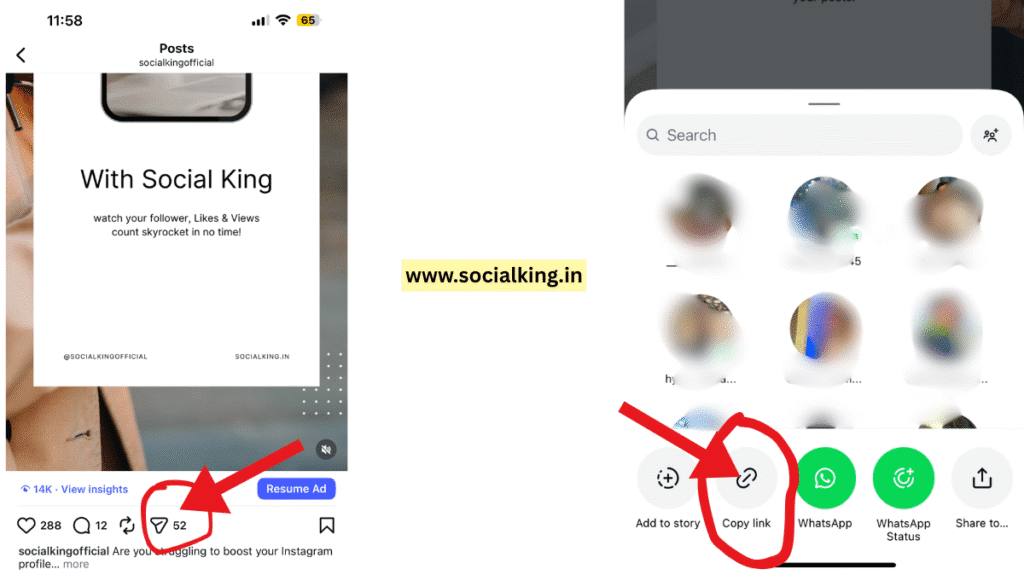
Have you ever wanted to save a video from Instagram? Now it’s super easy! Just follow these simple steps, and you’ll have your favourite content saved in minutes.
1. Copy the URL
Go to Instagram and find the video, reel, or post you want to download:
- Open Instagram and navigate to the content you want to save
- Tap the share in the bottom of the post
- Select “Copy Link”
For Instagram Stories:
- Tap on the story you want to download
- Use the share option to copy the link
Remember, you can only download videos from public accounts. Private content cannot be accessed for privacy reasons.
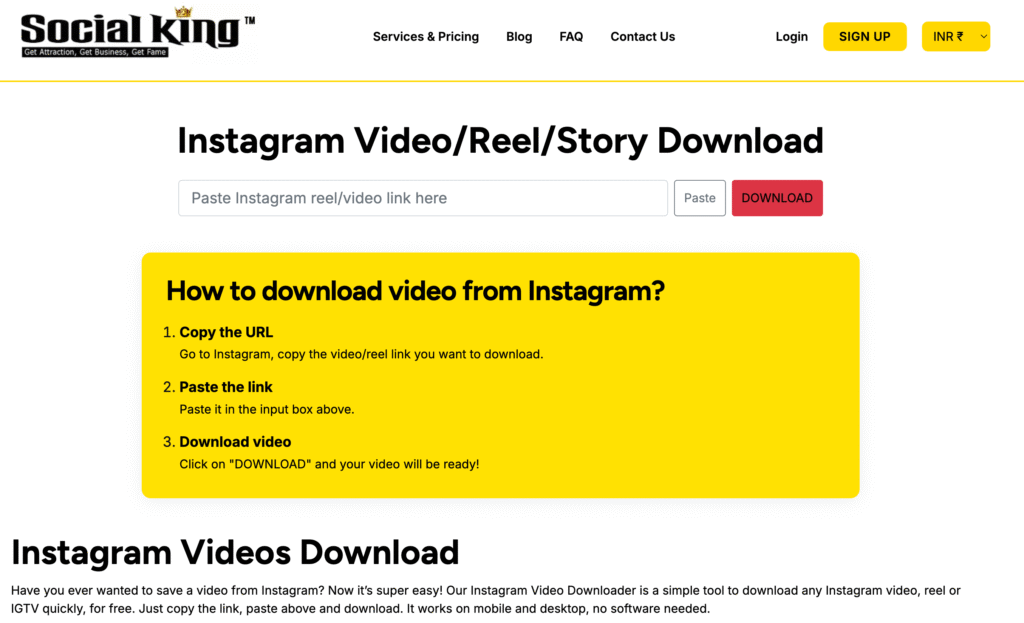
2. Paste the link
Open your chosen like SocialKing.in Instagram video downloader tool:
- Open the downloader in any web browser
- Find the input box (usually labelled “Paste link here”)
- Paste the copied Instagram URL into the field
No login required! The best tools work without asking for your Instagram credentials or personal information.
3. Choose quality
Select your preferred download options:
- Pick your desired resolution (typically 720p to 1080p available)
- Higher quality means larger file sizes
- For sharing on social media, 720p works great
Most quality tools offer watermark-free downloads, so you get the original Instagram video or reel without any additions.
4. Download video
Click “DOWNLOAD” and save to your device:
- Hit the download button after selecting your preferences
- iOS users: files save to the Files app under Downloads
- Android users: check your Downloads folder in the file manager
If your downloaded video has no audio, the original post might have been muted or used restricted music.
Ready to try a free Instagram video downloader? Start downloading your favourite Instagram videos today and build your collection of great content!
Best Free Instagram Video Downloaders – No Sign-Up Required!
Want to find the perfect Instagram video downloader? Here’s what you need to know! Not every downloader works the same way, but choosing the right one makes downloading super easy.
What makes a great downloader
Look for these must-have features:
- No registration needed – Skip tools that ask for your personal info
- Works everywhere – Mobile, tablet, desktop – it should handle them all
- Lightning-fast downloads – Nobody wants to wait around
- Zero tracking – Your downloads stay private
You might also want batch downloading if you save lots of videos at once.
Top no-registration downloaders
Here are reliable tools that work right away:
- SocialKing.in – Clean interface with watermark-free downloads. Best for HD Reels and Stories
- FastDL – Lightning-fast and works on any device
- SnapDownloader – Good for HD Reels and Stories
- SaveVid – Handles ultra-high resolution up to 8K
Just paste your video URL, and you’re ready to download!
Getting watermark-free videos
Want clean downloads without watermarks? ContentStudio and FastDL specifically offer watermark-free downloads. Your videos come out exactly like the originals – no extra logos or marks.
High-quality download options
For the best video quality:
- SaveVid downloads up to 8K resolution
- ContentStudio keeps the original quality on all devices
- SnapDownloader maintains HD quality perfectly
Ready to start downloading? Try one of these free tools today and get high-quality Instagram videos without any hassle!
Safety, Legality, and Best Practices
Do you want to download Instagram videos safely and legally? Here’s what you need to know to stay protected while enjoying your favourite content.
Is it legal to download Instagram videos?
Downloading Instagram videos for personal use is generally okay. However, Instagram’s Terms of Use state that users should not “copy, modify, distribute, sell, or lease any part of our Services”. This means saving videos for yourself is usually fine, but sharing them without permission crosses the line.
Avoiding copyright issues
Keep it simple when downloading Instagram content:
- Ask permission from creators before reposting
- Give proper credit when sharing downloaded content
- Never claim someone else’s work as yours
- Be extra careful with commercial content
Tips to stay anonymous and secure
Want maximum safety when downloading videos? Follow these steps:
- Use a VPN to protect your privacy and hide your IP address
- Choose downloaders that don’t require account information
- Browse in incognito mode to prevent tracking
- Clear your browsing history afterwards
When not to use a downloader
Skip the downloader in these situations:
- Private accounts you don’t follow
- Content explicitly marked as copyrighted
- Videos featuring licensed music or commercial products
- When creators have specifically requested no downloads
Remember, the best Instagram video downloaders respect both your privacy and creators’ rights. Stay safe and download responsibly!
Conclusion
Have you been looking for a simple way to save Instagram videos? Now you know exactly how to do it! Just copy any Instagram video link, paste it into a reliable downloader, and click download. It’s that simple.
No registration needed means you can start downloading immediately. Your privacy stays protected, and you get watermark-free videos in high quality. The best tools work on mobile and desktop, making it super convenient.
Remember to download only from public accounts for your personal use. Always respect creators’ rights when sharing content. Our guide covered the safest downloaders that won’t compromise your security.
Ready to start building your video collection? Try SocialKing’s Instagram Video Downloader today and experience hassle-free downloads with zero registration required!
User Reviews for SocialKing Instagram Video Downloader
- “SocialKing made downloading Instagram reels so easy! The tool is fast, and no registration was needed. I use it on my mobile every week.”
- “I tried many downloader sites, but SocialKing is the only one that saves videos without any annoying watermarks. Highly recommend!”
- “The step-by-step guide was super helpful. Downloaded my first Instagram video in minutes and the quality was perfect.”
- “Privacy was my top concern, but SocialKing’s tool didn’t ask for any personal info—totally safe and secure download!”
- “Customer support answered my questions instantly. Great experience overall.”
Key Takeaways
Here are the essential insights for safely downloading Instagram videos without compromising your privacy or security:
• No registration required: Use tools that access public Instagram videos directly without needing your login credentials or personal information to protect your privacy.
• Simple 4-step process: Copy the Instagram video link, paste it into a downloader tool, choose quality/format, then download to your device.
• Only public content accessible: Registration-free downloaders can only access videos from public Instagram accounts, not private profiles requiring authentication.
• Prioritise safety features: Choose downloaders that offer watermark-free downloads, high-quality preservation, and don’t track your activity.
• Respect copyright boundaries: Download only for personal use, always credit creators when sharing, and never redistribute commercial content without permission.
• Stay anonymous and secure: Use VPN protection, browse in incognito mode, and clear browsing history to maintain complete privacy while downloading.
When done correctly, downloading Instagram videos becomes a straightforward process that respects both your privacy and content creators’ rights while giving you access to high-quality, watermark-free content for personal enjoyment.
FAQs
Q1. How can I download Instagram videos without a watermark? You can use specialised Instagram video downloader tools that offer watermark-free downloads. Simply copy the video link, paste it into the tool, select your preferred quality, and download. Many reputable tools like ContentStudio and FastDL provide this feature without requiring registration.
Q2. Is there a way to download Instagram videos directly to my device? Yes, you can download Instagram videos directly to your device using free online tools. Copy the video URL, paste it into a downloader tool, choose your desired quality, and click download. The video will then save to your device’s default download location or camera roll.
Q3. Are Instagram video downloaders safe to use? Most reputable Instagram video downloaders are safe when used correctly. Look for tools that don’t require registration or personal information. It’s best to use downloaders that work directly through a web browser rather than requiring app installation for added security.
Q4. Can I legally download and use Instagram videos? Downloading Instagram videos for personal use is generally acceptable. However, redistributing or using downloaded content commercially without permission may violate copyright laws. Always credit the original creator and obtain permission before sharing or using downloaded content publicly.
Q5. What should I look for in a reliable Instagram video downloader? A reliable Instagram video downloader should offer features like no registration requirement, compatibility across devices, fast download speeds, and strong security measures. Look for tools that provide high-quality downloads without watermarks and support various Instagram content types like Reels, Stories, and IGTV.
Recommended

Social King Team
SocialKing Team is a dedicated group of social media experts and developers committed to building tools and strategies that empower creators and businesses. With combined expertise spanning social media growth, content optimization, algorithm research, and platform-specific strategies, the SocialKing team regularly shares actionable insights, product updates, and industry trends through our blog. Our mission is to make social media success accessible, transparent, and effective for everyone.
Get social growth tips in your inbox
Join the SocialKing newsletter — no spam, unsubscribe anytime.


