Table of Contents
- Step 1: Pick a Profitable Skill and Niche
- Step 2: Build a Simple Digital Product That Solves a Real Problem
- Step 3: Use AI to Create and Repurpose Content Fast
- Step 4: Grow and Monetize With LinkedIn Content
- FAQ: Common Questions About Digital Products on LinkedIn
- Conclusion
- Key Takeaways
- Recommended
Imagine waking up to $300 in notifications—from a PDF you uploaded months ago.
That’s the power of LinkedIn. While everyone is busy dancing on TikTok or fighting for attention on Instagram, smart creators are quietly making $10K/Month on LinkedIn with zero competition.
Most people think LinkedIn is just for finding jobs. They are wrong.
It is actually a hidden goldmine for selling simple digital products. And the best part? You don’t even need a website to start.

Why LinkedIn beats Instagram every time
Think about it:
- TikTok users are scrolling for fun.
- Instagram users are looking at lifestyle photos.
- LinkedIn users are there to invest in their careers.
They have the credit card in hand, ready to buy solutions. Yet, statistics show that 98.9% of users never post. This gap is where your opportunity lies.
If you have a skill—any skill—you are sitting on a pile of cash. But you need the right strategy to unlock it.
In this guide, I’m going to reveal the exact system to turn your LinkedIn profile into a passive income machine.
Warning: Make sure to read Step #3 carefully—it’s the secret tool that automates 90% of this work.
Step 1: Pick a Profitable Skill and Niche

By following this guide, you too can learn how to Make $10K/Month on LinkedIn.
Image Source: Skup
Digital product creators who succeed don’t start with the product—they start with a specific skill and niche. Your first step to creating profitable digital products is to identify your unique expertise that solves ground problems for a targeted audience.
How I chose my niche (AI + LinkedIn for professionals)
My niche choice wasn’t instant. My original approach was stuck in the “try to help everyone” cycle while offering general marketing services. My LinkedIn posts about AI tools got more engagement and questions as I tried different content.
I had my breakthrough when I combined my technical AI knowledge with LinkedIn expertise. Instead of serving “small businesses” broadly, I helped professionals use AI tools to build their LinkedIn presence. This specific mix—AI + LinkedIn for professionals—put me in a unique spot where few others existed.
The market backed my choice through steady demand. People searched for solutions where these topics met, and they gladly paid premium prices for specialised knowledge.
3 questions to find your high-value skill
These three vital questions will help you identify your high-value skill:
- What problems do you solve consistently? Patterns in what people ask for your help with show natural demand.
- Which skills deliver big value for clients yet are relatively easy for you to deliver? High-value skills create bigger results compared to the effort needed.
- Can you scale this skill quickly? Your expertise should fit into templates, guides, or courses that help many people.
Testing matters before you fully commit. Create a small “beta” offer around your best skill and reach out to existing connections at a reduced rate. Their eagerness to join and their results will verify your niche.
Avoiding the ‘generalist trap’
The “generalist trap” happens when professionals try to appeal to everyone and end up appealing to no one. Former CMO turned growth advisor Corey Quinn points out that this lack of focus creates bottlenecks, poor results, and a race to the bottom.
Specialists earn 2-3x more than generalists. Rather than saying “I do content marketing,” say “I create LinkedIn content for finance professionals.” This precision helps your ideal clients spot you right away.
Note that “Clarity comes from engagement, not thought. Begin with a broader service, test different niches, and watch which ones get the strongest response. The perfect niche doesn’t exist, notwithstanding that the profitable one does—but only if you pick one and stick to it.
Step 2: Build a Simple Digital Product That Solves a Real Problem

Image Source: Etsy
People want simple solutions, and that’s your path to a profitable digital product. Your next step is building something that fixes specific problems without making things too complex.
Creating digital products to sell without a website
You’ve never had an easier time selling digital products. A fancy website, expensive tools, or technical knowledge aren’t requirements anymore. Many creators make thousands each month by using platforms that handle all technical details.
Gumroad lets you sell digital products straight to your audience without any website. You create your product, get a link to share, and spread it wherever your audience hangs out – LinkedIn messages, posts, or your bio.
Your options also include Etsy for downloadable templates, Teachable for courses, or direct sales through email newsletters. The beauty lies in keeping things simple – you can pour your energy into creating value instead of dealing with websites or payment systems.
Examples: Templates, guides, mini-courses, coaching
The best digital products fix specific problems quickly. Here are some proven formats that work:
- Templates/Frameworks: LinkedIn post templates, proposal documents, or AI prompt collections that save people time
- Guides/Workbooks: Step-by-step systems that walk people through solving a specific challenge
- Mini-courses: Short, focused training (30-90 minutes) on niche skills like “How to Track Campaign ROI with GA4”
- Coaching packages: Time-based access to your expertise through calls or messaging
Templates give beginners the quickest path to their first sales. They’re easy to create and deliver instant value. One creator made $7,000 in just 56 hours by selling a simple digital product without a massive following or email list.
How to verify your idea before building it
Smart creators test the market before spending too much time on product development. Here’s how to verify your digital product idea:
- Interview potential customers about their frustrations in your niche
- Research social media groups where your audience discusses problems (look for recurring pain points)
- Create a minimal viable product (MVP) – a simplified version you can build in 1-2 hours
- Pre-sell your concept with a simple landing page before creating the full product
Pre-selling works especially when you have doubts. A product that people buy before it exists shows real demand. One creator collected $2,000 in verification payments using just a one-page offer document.
Note that verification isn’t about praise – it’s about commitment. Don’t ask “Do you like this idea?” Ask for a small, non-scalable commitment that proves real need.
Step 3: Use AI to Create and Repurpose Content Fast

Image Source: Supergrow
Most people struggle to create consistent content on LinkedIn. I’ve simplified the process to create a month’s worth of engaging posts in just 90 minutes.
My 90-minute Sunday content system
You can boost your content output by dedicating one focused session each week. My Sunday system helps me create 12 quality LinkedIn posts in a single sitting:
- First 10 minutes: Identify your target audience’s specific problems (this makes all content relevant)
- Next 60 minutes: Write two long-form articles (these become your “content spine”)
- Final 20 minutes: Use AI tools to create multiple post variations
The secret is to treat content as a multiplier rather than a daily task. Your long-form expertise does the heavy lifting while smaller posts expand your reach. This way, you get back hours each week for client work and product development.
Tools I use: ChatGPT, Buffer, Taplio
The right AI tools can simplify your content process:
ChatGPT: Creates article ideas and outlines based on your audience’s problems. Just ask it: “Given my audience [describe] and their pain point [describe], generate four LinkedIn article titles and 6-point outlines for each.”
Taplio: This LinkedIn-specific AI assistant analyses top-performing content in your niche. It studies thousands of successful posts on any topic you choose and shows what works among millions of posts. Its AI helps write posts based on 500+ million LinkedIn examples.
Buffer: This trusted social scheduler now comes with AI features. It combines tools for creating, scheduling, and analyzing social posts with an assistant that knows how to write engaging captions.
How to turn 1 idea into 10 posts
Content repurposing helps you maximise results while doing less work:
- Format shifting: Present the same message in different ways (text post, carousel, video, poll)
- Perspective change: Turn positive advice into “what not to do” posts
- Extract components: Split complete guides into focused individual posts
- Audience rotation: Share your best content every 6-12 months, since only 7% of your audience sees any single post
This system means you’re not starting from scratch each day. Instead, you’re reusing your best ideas across different formats and timeframes.
Note that LinkedIn values consistency more than frequency. Three well-planned posts weekly work better than random activity. Use Buffer or LinkedIn’s scheduler to maintain a steady presence without daily stress.
Step 4: Grow and Monetize With LinkedIn Content
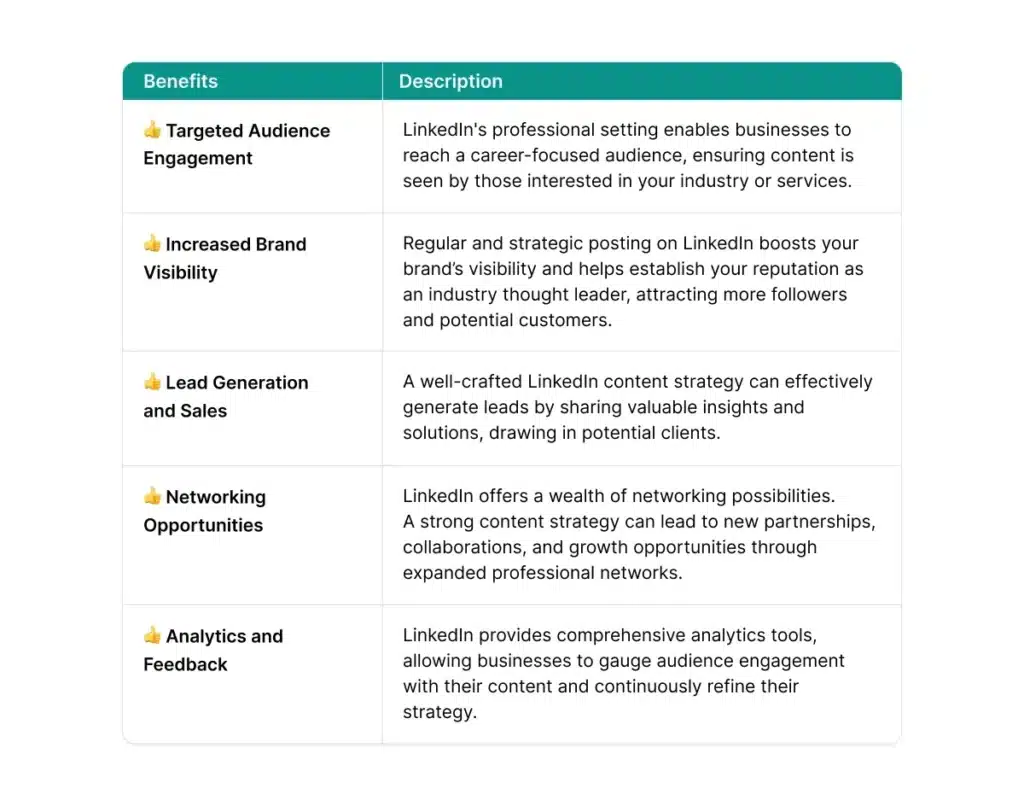
Image Source: AuthoredUp
Your content needs more than just posting – the right timing and strategy will help turn your posts into sales for your digital products.
Best times to post and why they matter
The right timing can double your post visibility. Several studies show these optimal posting windows:
- Tuesdays through Thursdays work best, and Tuesday shows the highest participation overall
- Mid-morning (10-11 am) and lunchtime (12-1 pm) get maximum participation
- Weekdays between 7am and 4 pm perform better than evenings and weekends consistently
LinkedIn professionals check the platform during work breaks, so timing becomes crucial. Posts during these peak times get twice as many comments compared to random posting times.
How to write posts that guide readers
Your post’s structure directly shapes how well it guides readers:
- Start with a pattern-breaking hook in the first 1-2 lines that makes people stop scrolling
- Solve one specific problem in each post (this works better than general advice)
- Use micro-stories showing transformation instead of lengthy how-tos
- Format for easy reading with short paragraphs and white space
- End with a conversation-starter, not a hard sell
Teaching before offering solutions works three times better than direct pitches.
Using DMs and comments to turn readers into buyers
These steps help move conversations forward naturally:
- Make it personal by mentioning something specific about their activity
- Ask simple questions that reveal their challenges
- Spot the gap between where they are and where they want to be before helping
- Try 2-3 follow-ups if conversations go quiet (half of all sales come from follow-ups)
Building real connections with LinkedIn users should come before any sales pitch.
FAQ: Common Questions About Digital Products on LinkedIn
Many entrepreneurs feel unsure about launching digital products. Here are the questions my coaching clients ask me the most.
Do I need a website to sell digital products?
Not at all! You can start selling digital products right away without a website. Platforms like Gumroad give you shareable links to use in your LinkedIn posts or messages. You just need to create your product, grab a link, and share it wherever your audience hangs out. Many creators make good money using third-party platforms that handle the technical side of selling.
How do I price my first product?
Here’s a pricing ladder to get you started:
- $9-$27: Simple tools, checklists, or swipe files (quick wins)
- $27-$97: Complete systems, template packs, or toolkits
- $97-$297: Mini-courses, workshops, or detailed guides
- $297+: Transformation packages with support/coaching
Your price shows your product’s value. Note that with proper ROI frameworks, AI-focused digital products can capture 25-50% of created value. This is a big deal as it means that traditional software only captures 10-20%.
What if I don’t have an audience yet?
We all start at zero. Your first step is to engage with 10-15 posts daily from your target audience before you create content. Your first 100 followers will come from existing Facebook groups, your personal network, previous clients, and local connections. You don’t need perfection – just post helpful content 3-5 times weekly, even with a small audience.
How long does it take to reach $10K/month?
Most creators need 4-6 months of steady work to reach $10K/month, though some hit this goal in 60 days with focused effort. One creator reached $10K in four months through daily outreach (25 connections daily) and strategic content creation. Success comes down to consistency – creators who post daily and keep reaching out will break through.
Conclusion
LinkedIn is the ideal platform for professionals who want to create and sell digital products. This piece reveals a clear path to making $10K/month without needing fancy websites, huge followings, or technical know-how.
The platform’s potential remains largely untapped. Most professionals see it only as a resume platform and miss its huge potential for digital product sales. You have the exact framework to take advantage of this gap.
Success depends on four elements: picking a specific niche, creating simple products that solve real problems, using AI to keep content flowing, and building meaningful connections with your audience. These foundations work whatever your starting point.
Many professionals get stuck in overthinking and so never begin. Your trip starts with one profitable skill that serves a specific audience. Create a simple template or guide this week instead of spending months planning the perfect course.
I started with simple AI templates for LinkedIn professionals. This one decision grew into a steady five-figure monthly income. You can follow the same path today.
LinkedIn rewards expertise and consistency more than anything else. Share valuable content 3-5 times weekly, build genuine connections, and solve specific problems for your audience. The algorithm will do its part and connect you with ideal prospects on the platform.
The $10K/month milestone is within reach if you take action. While others debate platform choices or chase perfection, you can start using these steps today. The proven system works – you just need to follow it steadily.
Make your first move this week. Pick your niche, create your minimum viable product, and share valuable content. The best time to start your LinkedIn digital product business isn’t later – it’s now.
Key Takeaways
Here are the essential insights for building a profitable digital product business on LinkedIn that can generate $10K/month:
• Choose a specific niche over being a generalist – Specialists earn 2-3x more than generalists by solving targeted problems for defined audiences.
• Start selling without a website using platforms like Gumroad – You can begin monetizing immediately with shareable links distributed through LinkedIn posts and messages.
• Use AI tools to create a month’s content in 90 minutes – Leverage ChatGPT, Buffer, and Taplio to turn one idea into 10 posts through strategic repurposing.
• Post consistently during peak hours (Tuesdays-Thursdays, 10-11 am) – Strategic timing doubles visibility while teaching-first content converts 3x better than direct pitches.
• Focus on solving specific problems rather than general advice – Simple templates and guides that address real pain points often outperform complex courses for beginners.
The LinkedIn opportunity is massive, with only 1.1% of users posting weekly content, creating minimal competition for those willing to share valuable expertise consistently. Success comes from implementation, not perfection – start with one digital product this week rather than planning the perfect course for months.
Recommended

Sophie Miller
Sophie Miller is a social media researcher with 6+ years of experience uncovering growth strategies and engagement techniques. Specializing in data-driven social media methods, Sophie has researched and documented proven tactics that help creators and brands scale authentically. Her insights on algorithm dynamics and audience psychology are featured regularly on SocialKing's blog.
Get social growth tips in your inbox
Join the SocialKing newsletter — no spam, unsubscribe anytime.


